

Audio By Carbonatix
Samsung brings new, innovative features found on its flagship Galaxy S20 series to the Galaxy S10 and Galaxy Note10 series through a software update) starting from March.
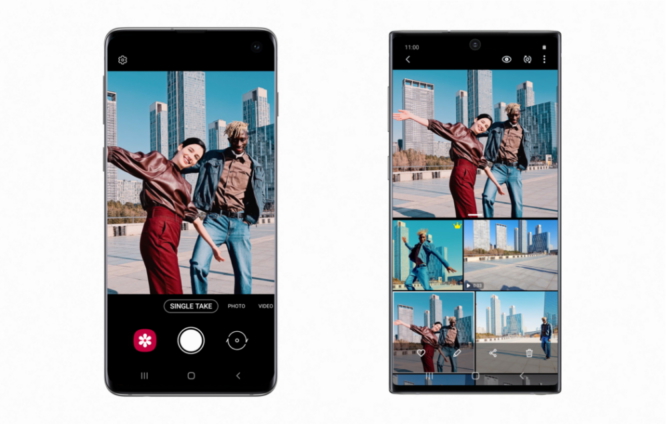
Users will be able to capture content with the latest Galaxy camera software technology, including Single Take mode.
Additionally, users will have access to a variety of software enhancements that make the entire Galaxy experience even more enjoyable.
Let’s dive into how Galaxy S20 features will work on the Galaxy S10 and Galaxy Note10.
Advanced photo and video experiences
This software update brings select Galaxy S20 photo and video experiences to the Galaxy S10 and Note10 series. With Single Take, stay in the moment while you capture the moment using integrated AI technology. Single Take uses the camera system and AI to capture a number of photos and videos at once and recommends the best shot for you.
With an improved Night Mode on the Galaxy S10 series, and the addition of Night Hyperlapse on both Galaxy S10 and Note10 series, you’ll be able to capture even more amazing photos and videos even in low light.
When you’ve captured that perfect image, Custom Filter lets you create your own filter with colours and styles you like from a favourite photo serving as inspiration.
This creates a reusable filter that can be applied to future photos when captured.
For the aspiring filmmaker, Pro Video gives you even more control, allowing you to adjust settings like ISO, shutter speed and exposure level. You can also switch between the front and rear cameras while recording video.
Intelligent gallery
This update also brings a variety of gallery features to help you organise your content.
Thanks to AI technology, with Clean View-enabled, the Gallery app automatically groups together similar shots of the same subject for a more organised gallery.
Users can easily review similar shots and select their favourite to serve as the photo group’s thumbnail. When viewing a photo in the gallery, you can zoom in on an image and press Quick Crop, located at the top left-hand corner, to crop photos to your desired size.
Easy sharing capabilities
You can now share more content quickly. With Quick Share, you can see which of your contacts are nearby and share photos, videos, or even large files with multiple people.
With Music Share, you can extend your paired Bluetooth connection and you don’t need to disconnect for a friend to play their music on a speaker or car stereo.
Latest Stories
-
The Ghanaian prophet and the mysterious death of his scottish wife Charmain Speirs
31 minutes -
Nearly 400 sentenced in Nigeria for links to militant Islamists
53 minutes -
Ghana’s recovery supported by gold strength despite global oil price pressures – Standard Bank Research
60 minutes -
Kwaku Azar writes: A-G vs OSP
2 hours -
Mfantsipim–Adisadel rivalry built excellence, not division – Sam Jonah
2 hours -
Vice President launches Mfantsipim’s 150 years of shaping Ghana’s greatest mind
2 hours -
I assure Otumfuo, Mahama will join him to commission KNUST Teaching Hospital by end of this year – Haruna Iddrisu
3 hours -
Barcelona dominate derby to extend La Liga lead
3 hours -
Gov’t to roll out free special education for persons with disabilities from July 1 – Education Minister
3 hours -
Importers and Exporters Association declares full support for Publican AI port system
4 hours -
“We used it to test our officiating officials’ readiness” – Bawah Fuseini after CAA Athletics event
4 hours -
Volleyball emerges as Ghana’s fastest rising sport
4 hours -
National Sports Fund needs strong leadership from the top – Administrator David Wuaku
4 hours -
JoySports Exclusive: Steve McLaren in talks with GFA after expressing interest in Black Stars job
4 hours -
Fire guts auto parts warehouse at Bubuashie, one fire officer injured
4 hours