

Audio By Carbonatix
In these difficult moments of Coronavirus, there are still some unscrupulous persons who are using unholy means of defrauding people. Whiles some are defrauding physically others also are using social media spaces like the internet.
One of the cybercrimes on the rise is phishing. Phishing is the fraudulent practice of sending emails purporting to be from reputable companies in order to induce individuals to reveal personal information, such as passwords and credit card numbers. These scammers or fraudsters use email or text messages to trick you into giving them your personal details of financial information.
This write-up is to draw your attention to this current phenomenon and what you can do to protect yourself.
How to recognise phishing
Scammers use email or text messages to trick you into giving them your personal information. They may try to steal your passwords, account numbers or staff ID. If they get that information, they could gain access to your email, bank, or other accounts. Scammers launch thousands of phishing attacks like these every day and they are often successful in their attempt due to ignorance. A huge amount of money is lost annually due to this criminal act by fraudsters.
Mostly these scammers often update or improve their tactics, but there are some signs that will help you recognise a phishing email or text message. Phishing emails and text messages may look like they are from a credible company you know or trust.
They may look like they are from a bank, a credit card company, a social networking site, an online payment website or app, or an online store.
Phishing emails and text messages often tell a story to trick you into clicking on a link or opening an attachment.
They may:
- say they have noticed some suspicious activity or log-in attempts
- claim there is a problem with your account or your payment information
- say you must confirm some personal information
- include a fake invoice
- want you to click on a link to make a payment
- say you are eligible to register for a government refund
- offer a coupon for free stuff
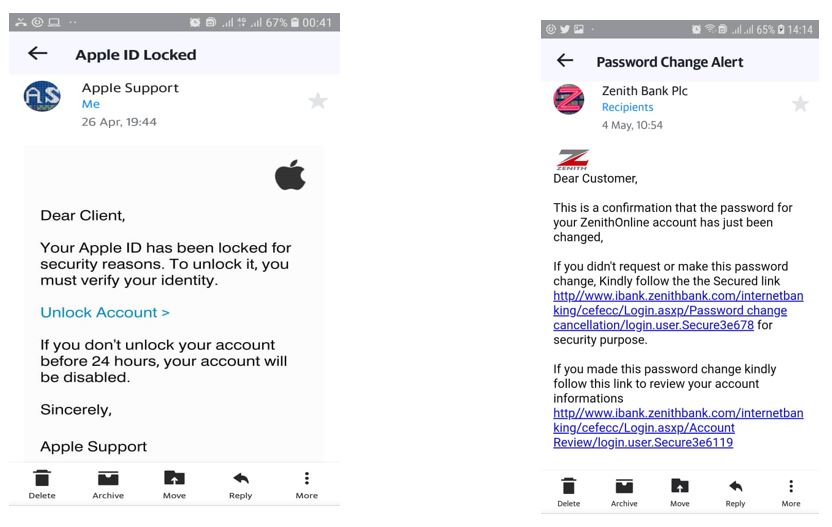
Imagine you saw this in your inbox. Do you see any signs that it’s a scam? Let’s take a look.
- The emails look like it’s from a company you may know and trust: Apple & Zenith Bank. They even used Apple and Zenith Bank logos. Making it more difficult for me to doubt their credibility.
- The Zenith Bank message was seeking confirmation for my password. The appeal email says my Apple ID has been blocked for security reasons. Meanwhile, I didn’t use an Apple product.
- They always have a generic greeting or salutation. eg. Hi Dear, Dear Client, Dear Customer. In my case, the Apple email says Dear Client. If you have an account with the business, it probably wouldn’t use a generic greeting like this. You would notice that messages from your bankers will use your name.
- The email invites you to click on a link to update your payment details.
- While, at a glance, this email might look real, it’s not. It is fake.
The scammers who send emails like this one do not have anything to do with the companies they pretend to be. Phishing emails can have real consequences for people who give scammers their information. And they can harm the reputation of the companies they are tricking that is why we need to be on the alert with our emails or message systems.
How to protect yourself from phishing attacks
Your email spam filters may keep many phishing emails out of your inbox. But scammers are always trying to outsmart spam filters, so it’s a good idea to add extra layers of protection. Here are four steps to follow to protect yourself from phishing attacks
- Protect your computer by using security software: Set the software to update automatically so that it can deal with any new security threats.
- Protect your mobile phone by setting software to update automatically: These updates could give you critical protection against security threats.
- Protect your accounts by using multi-factor authentication: Some accounts offer extra security by requiring two or more credentials to log in to your account. This makes it harder for scammers to log in to your accounts if they do get your username, Staff ID and password.
- Protect your data by backing it up: Back up your data and make sure those backups are not connected to your home network. You can copy your computer files to an external hard drive or cloud storage. Back up the data on your phone, too.
What to do if you suspect a phishing attack
There are two basic questions you should ask yourself in case you happen to get an email or a text message that asks you to click on a link or open an attachment:
- Do I have an account with the company?
- Do I know the person that contacted me?
If the answer is “No,” it could be a phishing scam. Quickly look for signs of a phishing scam. If you see them, report the message immediately and then delete it.
But if the answer is “Yes,” contact the company directly using a phone number or website you know is credible and reliable better still go to the office in person to confirm the veracity or otherwise of the email. And it always proper and advisable to go to the office.
What to do if you responded to a phishing mail
If you think a scammer has your information, like your credit card, Staff ID or bank details, you should report to the police service for their cybercrime unit to take an action.
If you think you clicked on a link or opened an attachment that downloaded harmful software, quickly update your computer’s or phone’s security software and then run a scan of your device.
Now you what to do if you get a phishing text message or email. Be on your guard against phishing and do not be updating or clicking anything that comes to you via the social media platforms. If you did that you would be risking yourself.
-
Rev. Fr. Stephen Kofi Sakpaku
Pax tecum
Latest Stories
-
Absa Bank Ghana names Stephen Ato Frimpong as Board Chair
5 minutes -
Pickford ‘almost caused crash’ with careless driving
7 minutes -
Author and former politician Jeffrey Archer dies aged 86
18 minutes -
No education reform can succeed without teachers – Education Ministry
27 minutes -
Gauff condemns racist abuse after China Open win
43 minutes -
Medvedev disqualified for hitting spectator with ball
52 minutes -
Oliseh scores twice in late comeback win for France
1 hour -
Pentagon stops using Anthropic AI tools after blacklisting company, BBC told
1 hour -
From despair to dance: Family of nurse Salomey Baffoe rejoices after GH¢100k bail granted
2 hours -
Kejetia Phase III pricing talks loom as government moves to restart stalled works
2 hours -
Nchiraa Yam festival: Two killed, 14 injured as police restore calm
2 hours -
I draw inspiration for my songs from Reggae music – Lyrical Joe
2 hours -
AI must not replace human judgment in public spending – BoG Governor
2 hours -
Ghana should withdraw from 2027 AFCON – Kojo Addae Mensah
3 hours -
Team Ghana departs Accra for Angola ahead of Karting Africa Trophy
3 hours